How To Add People on Spotify?
Have you ever wondered how sharing one Spotify account with all the family members and enjoying all the perks together sounds like? Imagine bearing the cost of one subscription with multiple individuals enjoying the perks together. Imagine that you can have your playlists, preferences, and recommendations within a single shared account without having to compromise your music history privacy. Are you unsure how to unfold this entire process?
That’s where the Spotify Family comes in. The Spotify family account is like having a shared music hub that can save you bucks, enjoy individual playlists, and no privacy invasion along with ease of use and control. You can share a single Spotify account with up to 6 family members. The post will guide you on how to add people on Spotify accounts so you can enjoy your family moments even better with Spotify.
Key TakeAway
Quick Notes on how to add people to the Spotify premium family plan. For a detailed guide, keep reading the post further.
What is the Spotify Premium family plan?
The Spotify premium family plan is one of the premium plans of Spotify. This plan lets 6 family members join the same subscription. In this way, 6 members of each family can enjoy the perks at the price of one account while enjoying 6 customized playlists, preferences, and tailored artists and libraries and the Spotify premium plans cost $16.99 a month.
The Spotify Premium family plan is a cost-effective plan that lets your family members enjoy all the premium features without having to subscribe to Spotify Premium individually. The Spotify intelligence is specially designed to find if all the members belong to the same family and live under the same roof. The algorithm shuts and bans the account in case of violation.
How to sign up for the Spotify premium family plan?
The very first thing when you are looking to add friends to a Spotify premium account is to sign up for a family account. The premium Spotify family plan costs $14.99 a month and a total of 6 members can use the account individually. To sign up for this plan, go to the web browser and follow the link here. Once you have signed up or upgraded to the Spotify family account.
How to Add people on Spotify account?
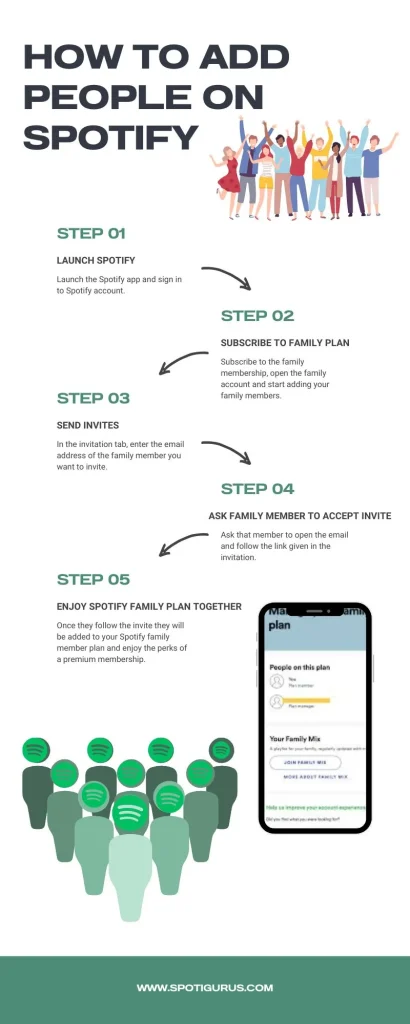
Spotify family accounts can add up to 6 persons in a family. The only limitation is that Spotify makes sure that all these members belong to the same family by cross-checking their location. If all the members you plan to accommodate in your Spotify family premium plan are under one roof, you are good to go. Follow the given steps and use the family account at its optimum level.
STEP 1: SIGN IN
Launch the Spotify app and sign in to the Spotify account.
STEP 2: OPEN FAMILY ACCOUNTS AND INVITE
Go to the accounts, Select the family tab from the menu, and click the invite button on the top right of the page. Make sure you already have purchased the Spotify premium family plan to have the “Family Tab” option available to you.
STEP 3: SEND INVITATION
In the invite tab, enter the email address of the person you want to invite to your Spotify premium family plan.
STEP 4: FOLLOW THE LINK IN THE EMAIL
Ask the family members to whom you have sent the invitation emails, to check their emails and follow the invitation link to join the family plan. If the members already had not signed up on Spotify, then let them sign up first to join the family plan.
STEP 5: ACCEPT INVITATION
After the members have successfully created their Spotify account, they must follow the invitation and accept it to enjoy the perks of a premium family account.
Why can’t I add a family member to Spotify?
The process to add people to a Spotify family account is easy peasy. However, if you still can’t add a family member to Spotify then there might be reasons.
Already exceeded the member limit
The Spotify family account allows only 6 persons in the $16.99/month plan including the account owner itself. If you are trying to exceed the member limit, Spotify will not let the member join the family unless you remove an already existing member from the plan.
Members location issue
Spotify’s intelligence is smart enough to detect the location of the family member. If you have shared the link with a person who does not share the same address with you, that person will not be allowed to join the clan.
Technical issue
If everything else is fine and still you are having problems to add people on Spotify family account then this might be a technical issue. In such a case, you can reach out to Spotify’s technical team to resolve the issue. A few basic tips to resolve before reaching out to technical support is to check that the person is not following the correct link or restart your device and try again.
Why join the Spotify Premium Family plan?
Spotify premium plan is by far the most efficient plan introduced by Spotify. There are a plethora of reasons for which I can vouch for this plan. However, a few among them are significant and necessary to highlight here.
Cost Efficient
The best part about the Spotify premium plan is that you can split the cost of the plan among the individuals. In this way, you will not have to bear individual plan costs separately, saving you enough bucks.
Sharing subscription
You can share the benefits of the premium subscription with your family members living under a roof. Each of them will be able to enjoy the perks of a single subscription, yet, individual Spotify accounts. All 6 members can enjoy every individual feature of Spotify premium APK.
Access to Spotify Kids
You have kids in your family who can also share the kids’ specific content. The family premium plan lets you access kids-friendly content.
Manage the overall plan
Because you are the manager of the premium family plan, you can add and remove members, adjust plan settings, and access any non-authoritative usage of any member.
How does Spotify verify your address?
Spotify ensures that the members who are added to the premium plan belong to the same address. Here are different ways through which Spotify verifies addresses.
- Spotify asks for the submission of a Government-issued ID card or passport and then matches them with other members of the Spotify family.
- Spotify asks the user to enter the residence address upon signup and matches it with that of the plan owner.
- Spotify also verifies addresses with other public and private data sources.
Read the Terms and Conditions for Spotify Premium for Family to get an idea of the Eligibility, Criteria, and Basic Requirements for this plan.
How to remove Premium for family members?
There might be instances when you want to revoke the membership of a particular family member or you have mistakenly sent the invitation to the wrong email address. In such cases, you can easily disable the link for a user to share the premium plan. Here are two methods to help you revoke the membership of an already existing member or a wrong invite sent.
Wrong invite sent
If you have sent the invitation to the wrong email address and the status of the shared link is still “waiting for one person”, you can follow these steps to disable such links.
Remove an already existing member
Revert to a single subscription plan or cancel a subscription
Now that you do not plan to use the family premium plan anymore because you do not have members to add people on Spotify or you want to cancel the plan altogether.
Back to a single subscription
Under the subscription and payment tab, click “Switch to Premium”. It will revert you to a single-user account
Cancel the premium
Click “cancel your subscription” to completely opt out of the premium family plan.
Has any family member’s link expired?
In case one of the family member’s links has expired, try opening the link in a private or incognito window. If it doesn’t work, ask the plan owner to send you a new invite.
FAQs
To Wrap up
So, if you are a music lover family, Spotify is there to cater to you. The premium plan lets you share the same subscription with your family members to enjoy music at its best. The cost-splitting factor is the most significant benefit of the Spotify family premium plan.
The Spotify family plan is also available for Spotify for IOS and Spotify for PC and MAC. You can also feel free to ask any query, we are here to help and guide you.